What Is a Technical SEO Audit (And Why Does Your Website Need One)?
A technical SEO audit is a systematic evaluation of your website’s infrastructure – the behind-the-scenes
elements that determine whether search engines can effectively crawl, index, and rank your content.
Think of it this way…
You could have the best content and the strongest backlink profile in your industry, but if
Google can’t properly access and understand your site, none of it matters.
At Digital Nomads HQ, technical audits are the foundation of our proprietary SearchLight framework.
Before we touch a single keyword or write a line of content, our specialists tear through the technical layer first. It’s where we consistently uncover the biggest quick wins for our clients – issues silently costing them rankings
and revenue.
We’ve distilled everything our team checks across 500+ projects into this checklist.
Whether you’re a business owner doing a DIY health check or a marketing manager briefing your dev team, this guide will walk you through every critical checkpoint.
In this guide, we’ll cover:
- Crawlability & Indexing
- Site Architecture & URL Structure
- Page Speed & Core Web Vitals
- Mobile Usability
- HTTPS & Security
- Structured Data & Schema Markup
- International & Multilingual SEO
- Log File Analysis & Advanced Checks
- Tools We Recommend
Let’s get into it.
Crawlability & Indexing
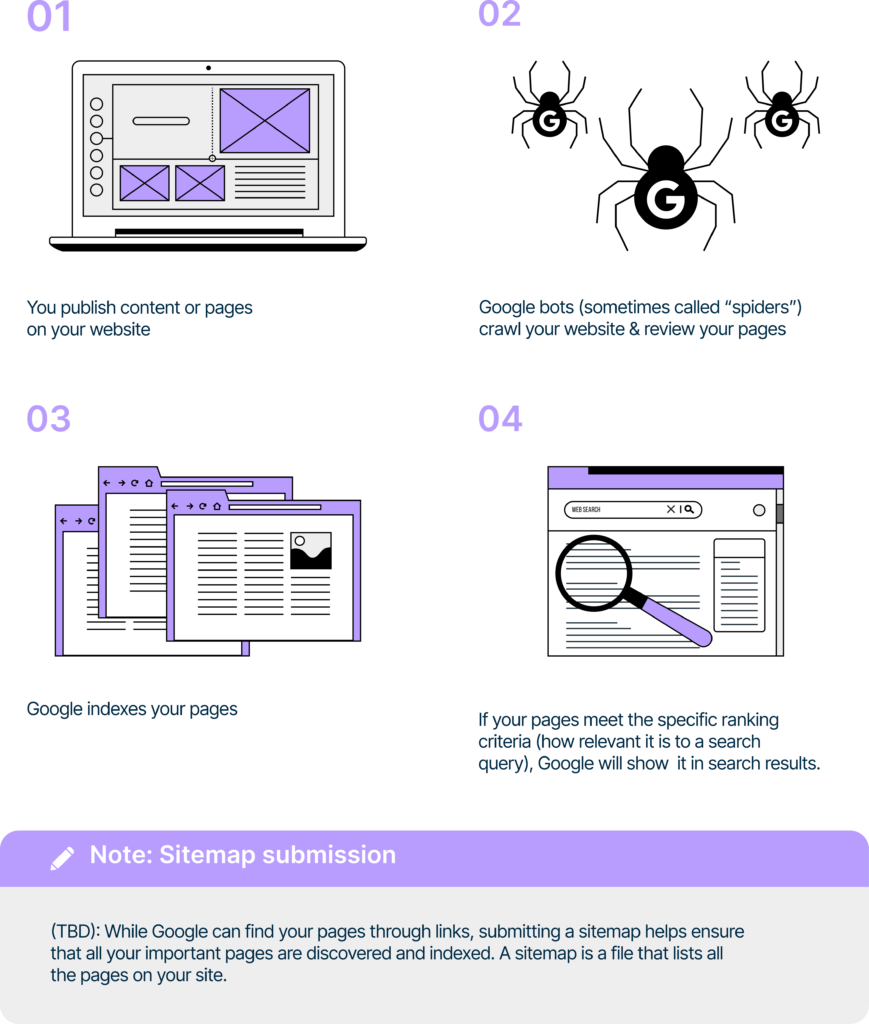
Crawlability & Indexing
Your robots.txt file tells search engine crawlers which parts of your site they’re allowed (or not allowed) to
access.
A misconfigured robots.txt is one of the most common technical SEO issues we encounter at the agency and it can silently de-index entire sections of your site (This is not good!)
What to check:
- Access your file at yourdomain.com.au/robots.txt
- Confirm critical pages and directories are NOT blocked (especially / , /blog/ , product pages)
- Ensure CSS and JavaScript files aren’t blocked – Google needs these to render your pages
- Verify your XML sitemap URL is referenced
- Check for accidental Disallow: / directives (this blocks your entire site
Common mistakes we see: Staging site robots.txt rules accidentally carried over to the live site after a migration. We’ve seen businesses lose months of organic traffic from this single oversight.
2. XML Sitemap Health
Your XML sitemap is essentially a roadmap for search engines – it tells them which pages exist and which
ones matter most – This is what they look like:
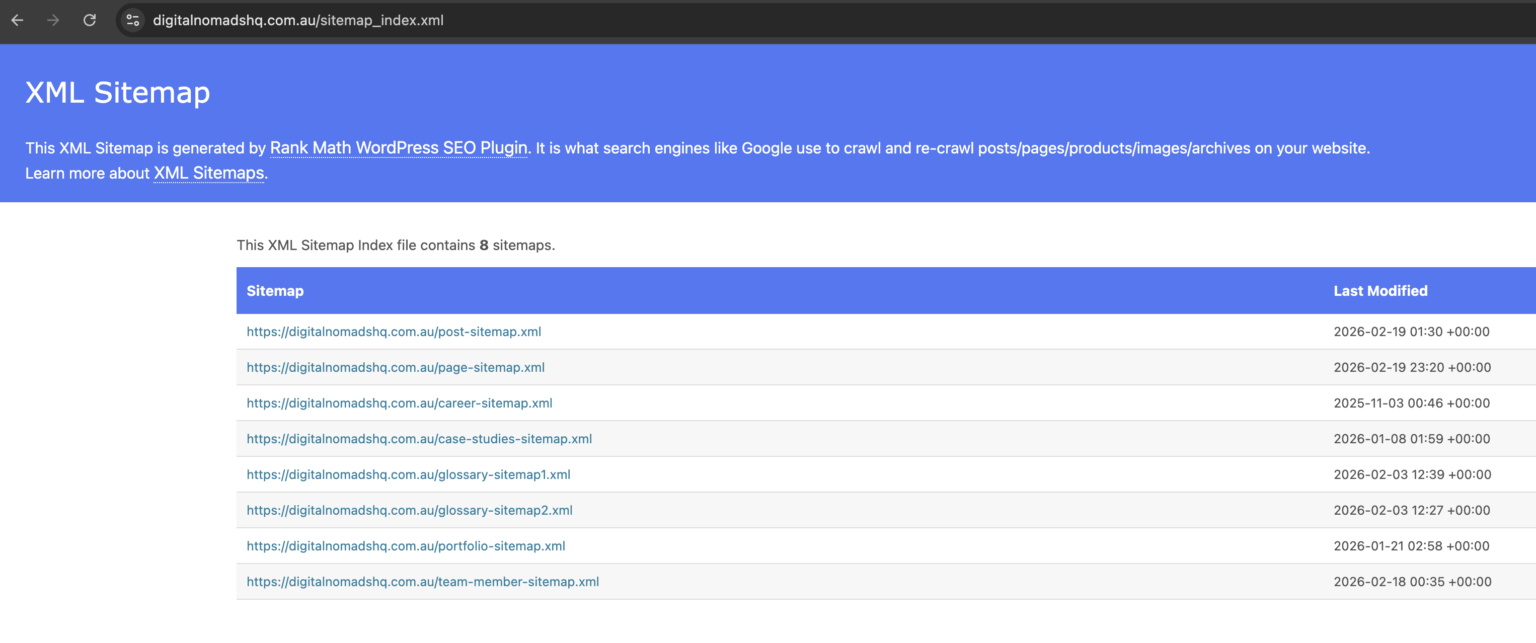
What to check:
- Sitemap is accessible at yourdomain.com.au/sitemap.xml (or referenced in robots.txt) or sitemap_index.xml
- All important pages are included
- No 404, 301, or 4xx/5xx URLs are listed in the sitemap
- Sitemap doesn’t exceed 50,000 URLs or 50MB per file (use sitemap index files if needed)
dates are accurate and update when content changes - Sitemap is submitted in Google Search Console
Pro tip: Regularly audit your sitemap against your actual live pages (AI tools can help with this to speed up the manual process). Orphaned URLs in your sitemap waste crawl budget and send mixed signals.
3. Google Search Console Index Coverage
Google Search Console is your direct line to understanding how Google sees your site.
The Index Coverage report reveals exactly which pages are indexed, excluded, or erroring out. You can access this in your Google Search Console under the indexing tab.
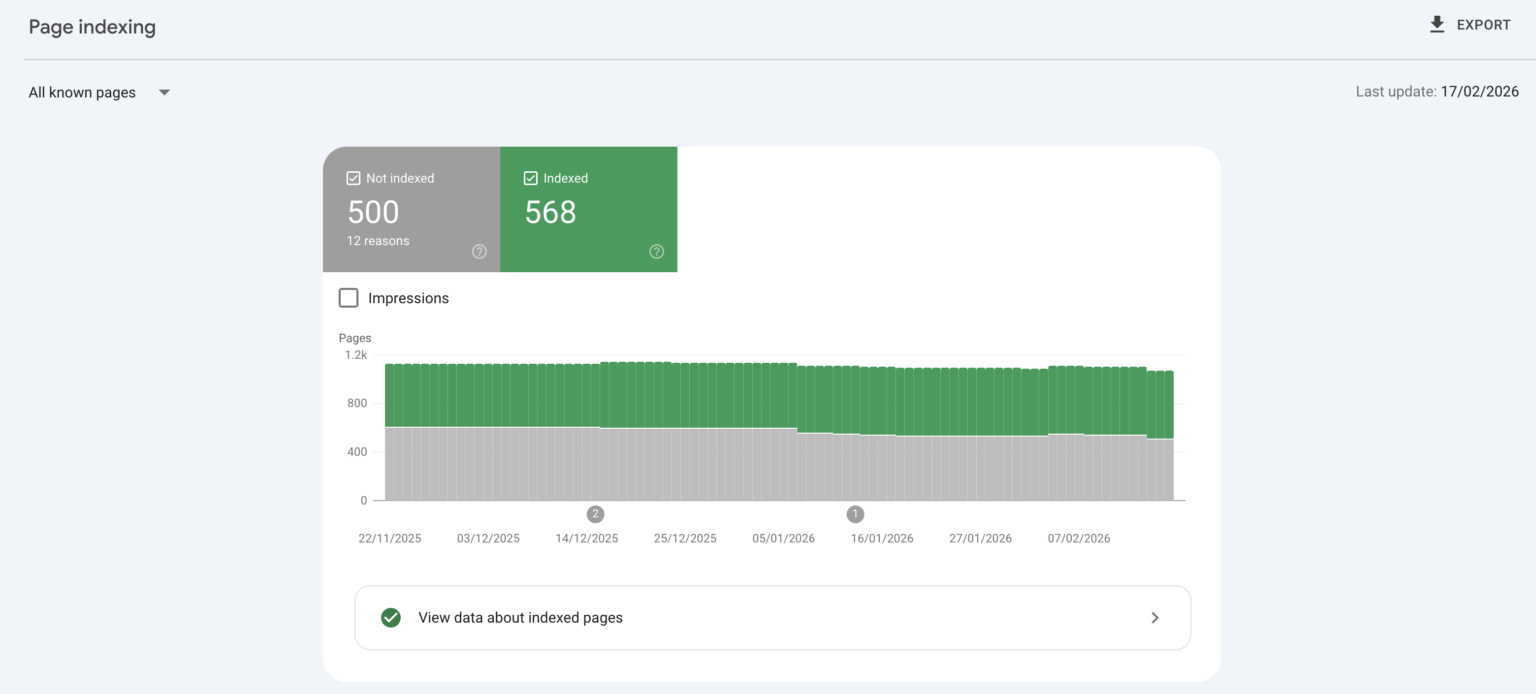
Beneath your indexed and not indexed page report Google Search Console provides you with a “Why pages aren’t indexed” section to further breakdown your indexing insights.
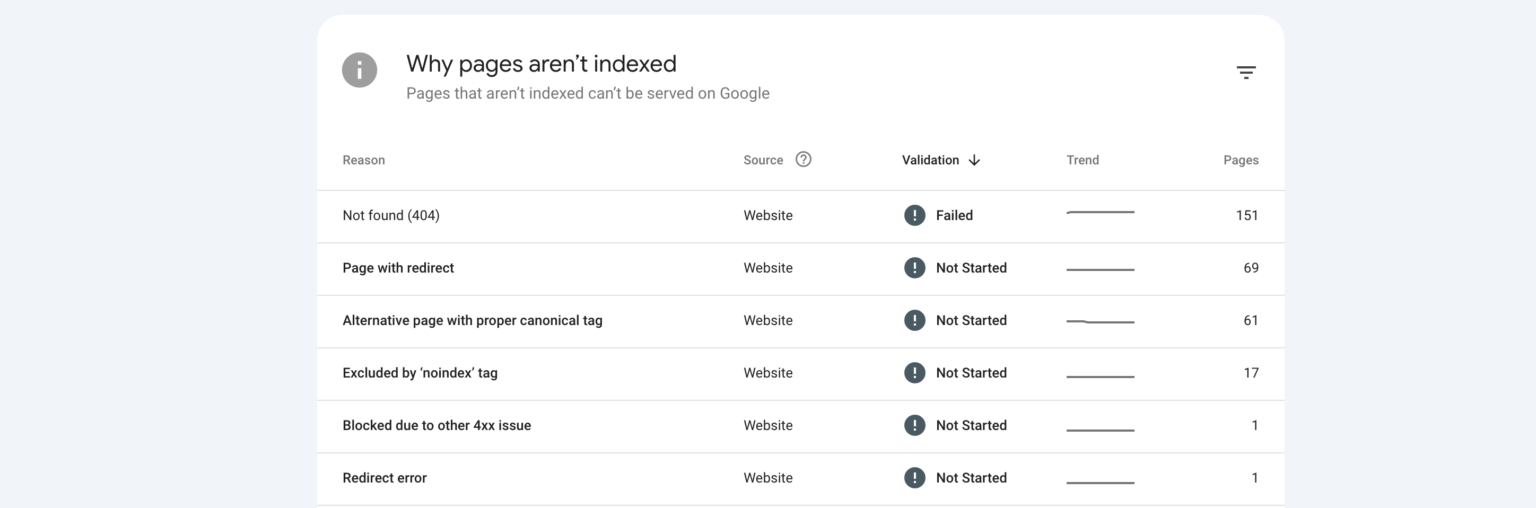
What to check:
- Review “Pages” report for errors, warnings, and excluded pages
- Investigate “Crawled – currently not indexed” pages (Google found them but chose not to index them –
often a content quality signal) - Check for “Discovered – currently not indexed” pages (Google knows they exist but hasn’t crawled them
yet, could indicate crawl budget issues) - Look for unexpected “Excluded by noindex tag” entries
Monitor “Duplicate without user-selected canonical” warnings
4. Crawl Budget Optimisation
Crawl budget is the number of pages Googlebot will crawl on your site within a given timeframe. For small
sites (under 1,000 pages), this is rarely an issue. However, large eCommerce sites or content-heavy publishers, it’s critical and something that needs to be managed.
What to check:
- Identify and fix or noindex low-value pages (thin content, tag pages, empty archive pages)
- Remove or consolidate duplicate content
- Fix redirect chains (more than two hops wastes crawl budget)
- Ensure internal linking prioritises high-value pages
- Check server response times – slow responses reduce the number of pages Google can crawl
5. Canonical Tags
Canonical tags tell search engines which version of a page is the “master” copy when duplicate or similar
content exists on the same domain – get these wrong, and you risk splitting ranking signals across multiple URLs.
What to check:
- Every indexable page has a self-referencing canonical tag

- Duplicate pages (HTTP vs HTTPS, www vs non-www, trailing slashes, parameterised URLs) point canonicals to the preferred version
- Canonical tags aren’t pointing to 404 pages, redirected URLs, or noindexed pages
- Paginated pages handle canonicals correctly (don’t canonical page 2 back to page 1 unless you genuinely want that)
6. Meta Robots & Noindex Tags
These directives give you granular control over which pages search engines should index and which links they
should follow.
What to check:
- Important pages don’t have accidental noindex tags
- Internal search results pages, thank-you pages, and login pages ARE noindexed
- nofollow isn’t applied to internal links (you’re wasting link equity)
- Check both the HTMLtag and the HTTP X-Robots-Tag header – they can conflict
Site Architecture & URL Structure
7. URL Structure
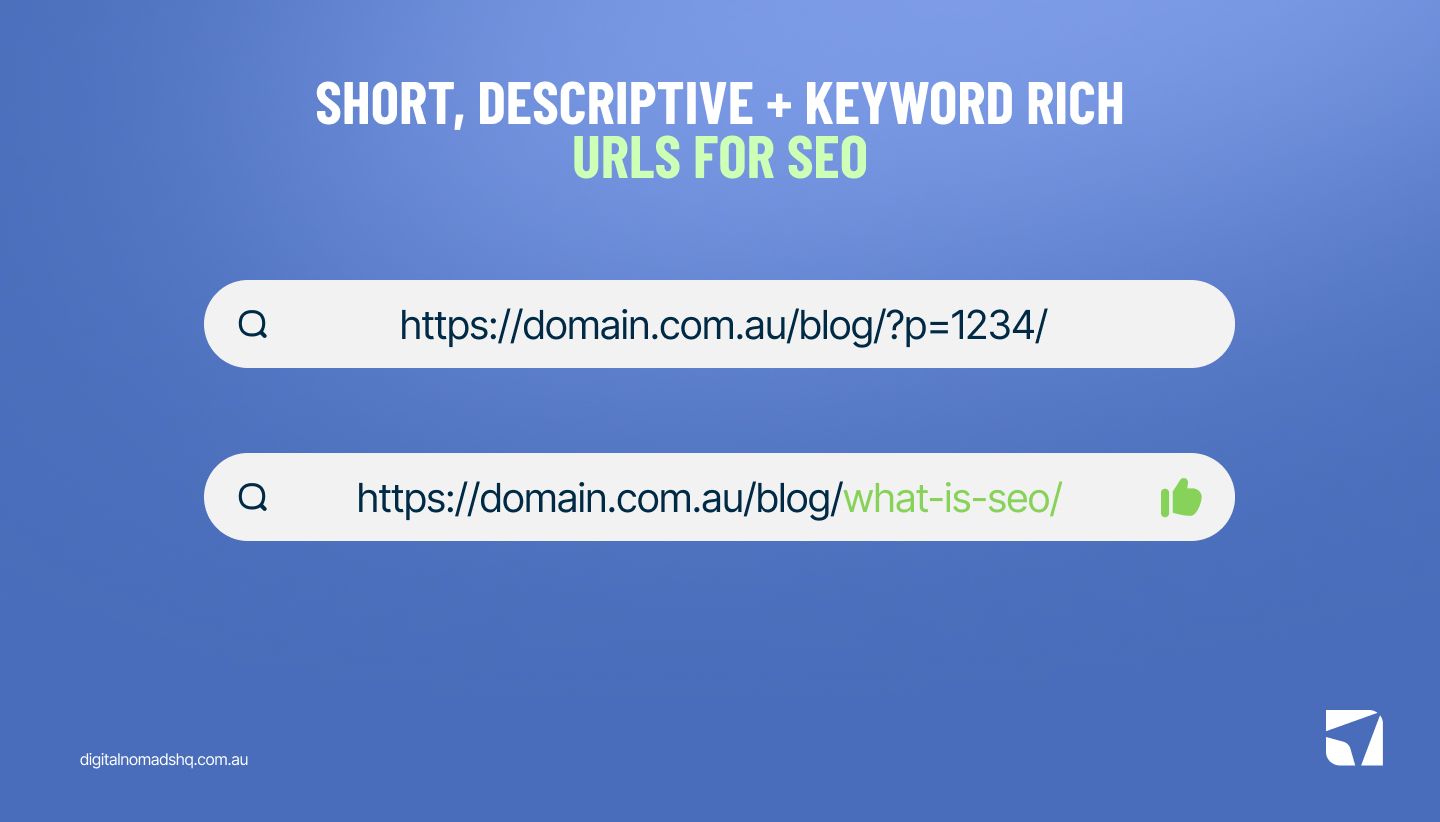
Clean, descriptive URLs make it easier for both users and search engines to understand your content hierarchy.
What to check:
- URLs are short, descriptive, and use hyphens (not underscores)
- URLs follow a logical hierarchy (e.g., /blog/what-is-seo/ not /blog/?p=1234/ )
- No dynamic parameters in indexed URLs where possible
- No uppercase characters, special characters, or spaces
- Consistent trailing slash usage (pick one and stick with it)
8. Site Depth & Internal Linking
Every important page on your site should be reachable within three clicks from the homepage. Pages buried
deeper than this will receive less crawl attention… less attention = less link equity… less link equity = lower performance.
What to check:
- Key landing pages, service pages, and high-value content are within 3 clicks of the homepage
- Orphan pages (pages with zero internal links pointing to them) are identified and linked
- Internal anchor text is descriptive and keyword-relevant (not “click here”)
- Navigation menus, breadcrumbs, and footer links create logical pathways
- Related content modules and contextual links are used within body content
9. Breadcrumb Navigation
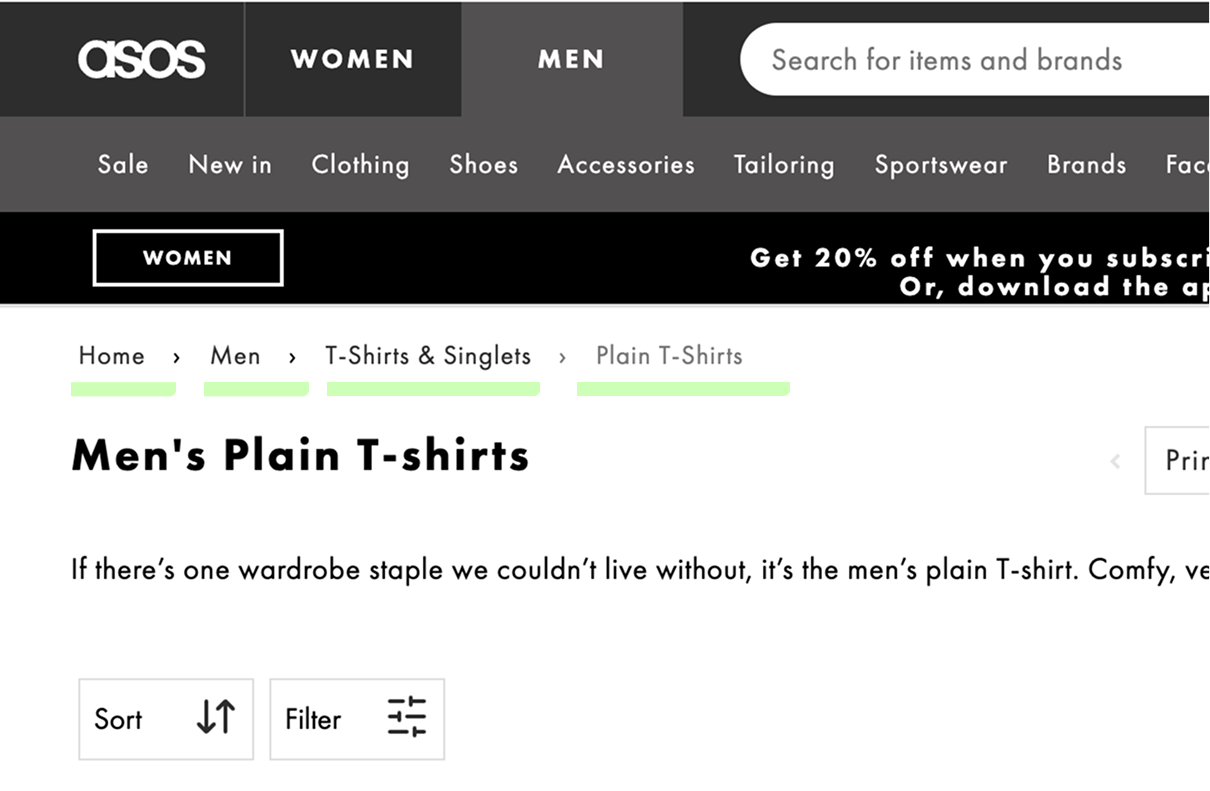
Breadcrumbs serve dual purposes: they improve user navigation and give search engines additional context
about your site hierarchy. Google frequently displays breadcrumbs in search results too.
What to check:
- Breadcrumbs are present on all pages except the homepage
- They accurately reflect the page’s position in the site hierarchy
- BreadcrumbList structured data is implemented correctly
- Breadcrumb links are functional and point to the correct parent pages
10. Redirect Management
Redirects are an unavoidable part of website maintenance, but mismanaged redirects create technical debt that
accumulates over time.
What to check:
- All redirects use 301 (permanent) unless a 302 (temporary) is genuinely appropriate
- No redirect chains exist (A → B → C should be A → C)
- No redirect loops
- Old URLs from site migrations are properly redirected to equivalent content (not just the homepage)
- Soft 404s are identified – pages that return a 200 status code but display error content
11. 404 Error Monitoring
Broken links and 404 errors harm user experience and waste crawl budget. They also leak link equity from any
external sites linking to those dead URLs.
What to check:
- Google Search Console crawl errors are reviewed and resolved regularly
- High-authority 404 pages are redirected to relevant content
- Custom 404 page is in place with helpful navigation and search functionality
- Internal links pointing to 404 pages are updated
Page Speed & Core Web Vitals
Page speed isn’t just a ranking factor it’s a conversion factor! People don’t want to wait for your website to load… it’s quite simple.
Google has made Core Web Vitals a confirmed ranking signal, and our own data across client campaigns consistently shows that faster sites convert better. This is where technical SEO meets conversion rate optimisation.
12. Core Web Vitals Assessment
Core Web Vitals are Google’s user-centric performance metrics. As of 2026, these are the three you need to nail:
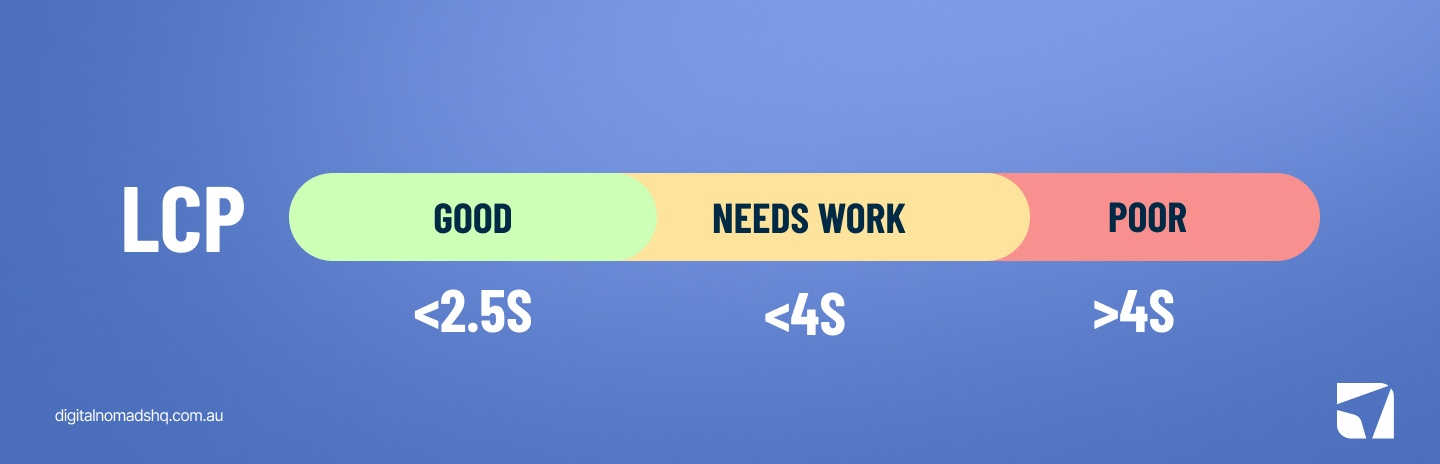
Largest Contentful Paint (LCP) — How fast the largest visible content element loads. Target: Under 2.5
seconds.
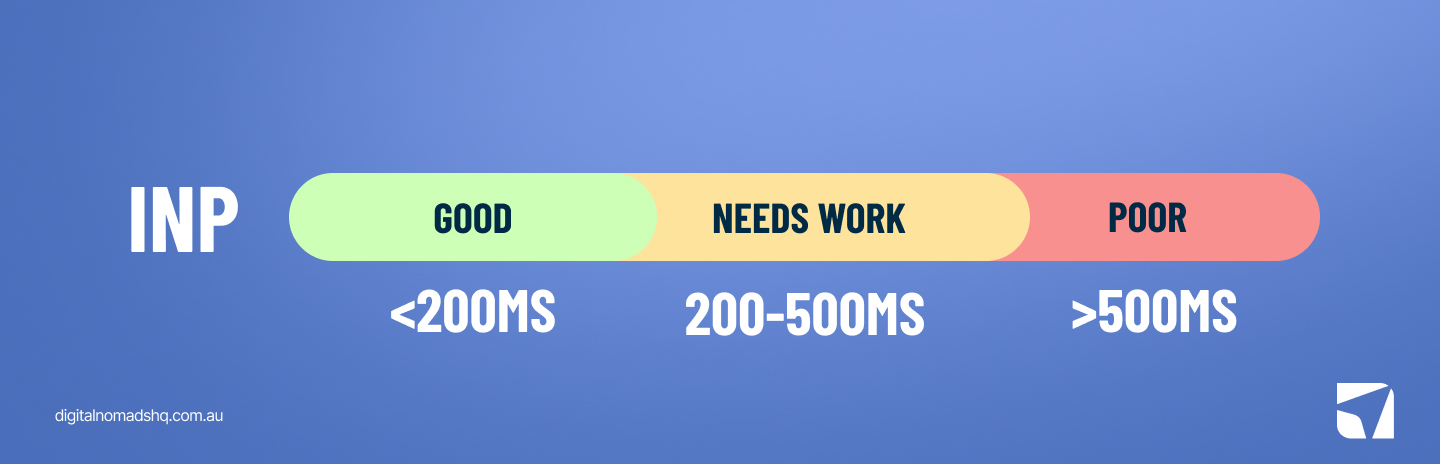
Interaction to Next Paint (INP) — How responsive the page is to user interactions. Target: Under 200
milliseconds.
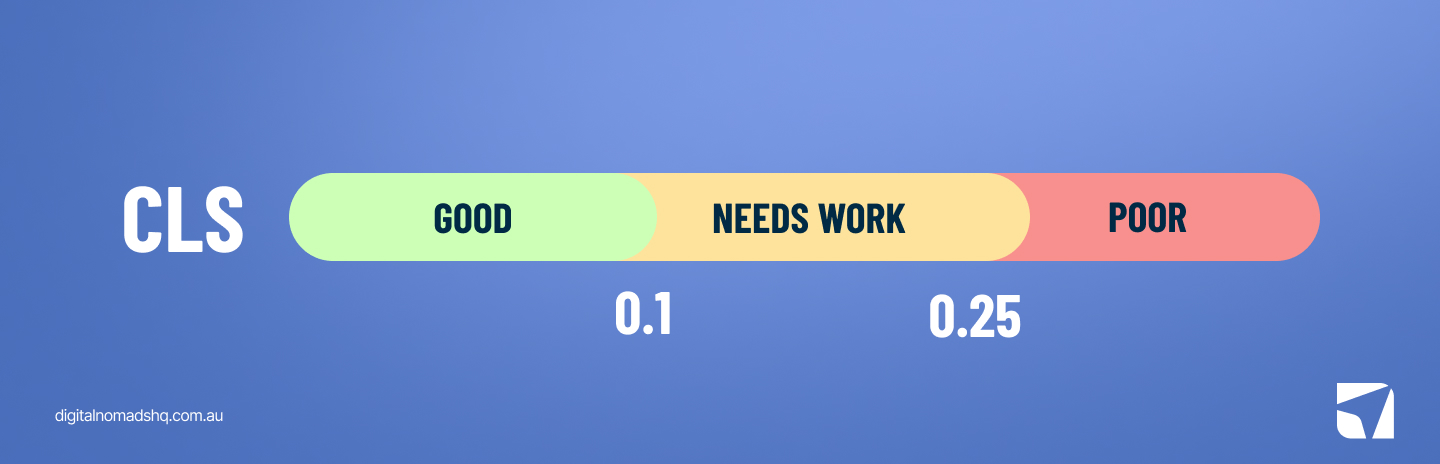
Cumulative Layout Shift (CLS) — How much the page layout shifts during loading. Target: Under 0.1.
How to check:
- Google Search Console > Core Web Vitals report (uses real-user data)
- PageSpeed Insights (combines lab and field data)
- Chrome User Experience Report (CrUX) for field data
13. Image Optimisation
Images are consistently the largest contributor to page weight.
Unoptimised images are the low-hanging fruit of site speed – we see TOO MANY websites coming through with images 1-2mb+ or 2000-3000px+ in size and being use for a blog thumbnail… not ideal.
What to check:
- All images are served in next-gen formats (WebP or A VIF)
- Images are properly compressed without noticeable quality loss
- Responsive images use srcset to serve appropriate sizes per device
- All images have descriptive alt text (accessibility AND SEO benefit)
- Lazy loading is implemented for below-the-fold images
- Image dimensions are explicitly defined to prevent CLS
14. JavaScript & CSS Optimisation
Render-blocking resources delay how quickly your page displays content to users and bots:
What to check:
- Critical CSS is inlined; non-critical CSS is deferred
- JavaScript files are deferred or loaded asynchronously where possible
- Unused CSS and JavaScript are removed or tree-shaken
- Third-party scripts (analytics, chat widgets, tag managers) are audited for performance impact
- Server-side rendering (SSR) or pre-rendering is used for JavaScript-heavy frameworks
15. Server Response Time (TTFB)
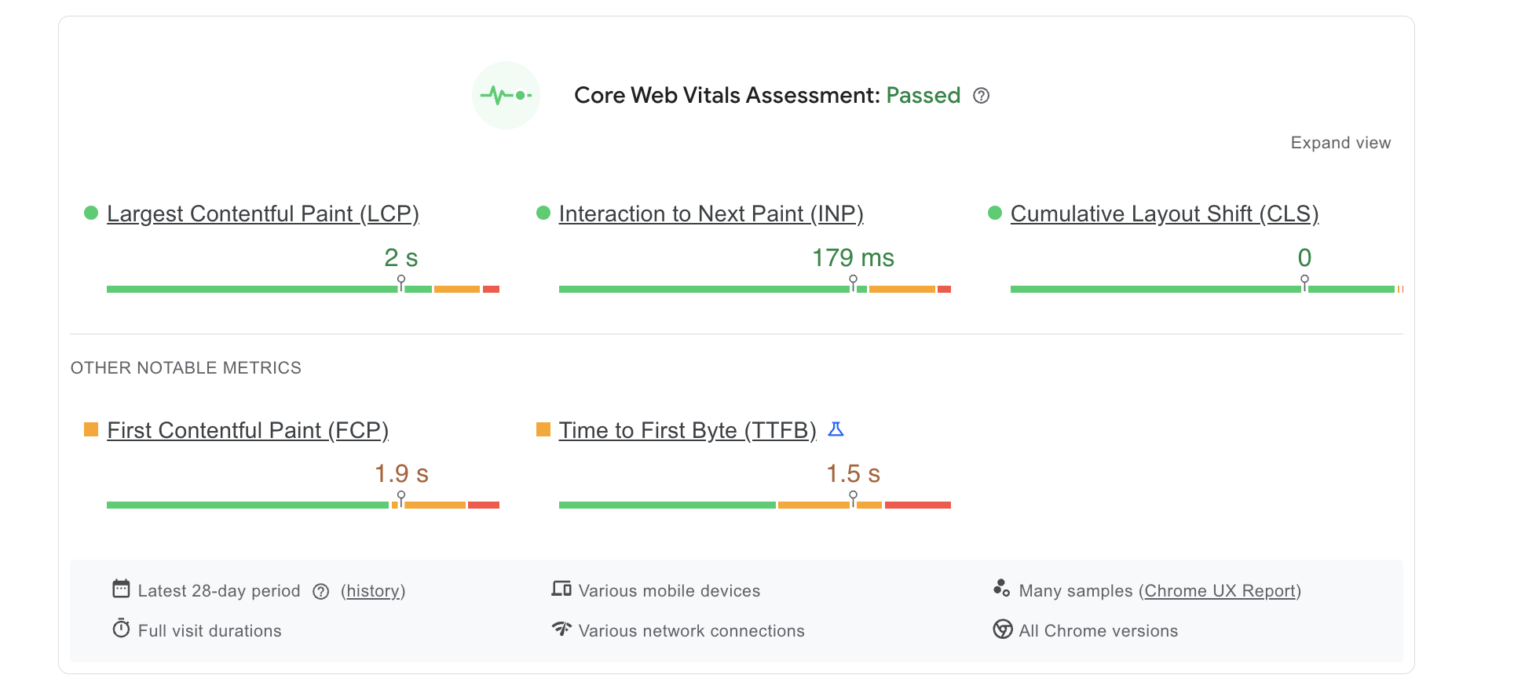
Time to First Byte (TTFB) is how long it takes your server to respond to a request.
A slow TTFB cascades into slow everything else – you can check your server response through Googles page speed insights tool – This will provide the previously mentioned INP, LCP and CLS metrics also.
What to check:
- TTFB is under 200ms for most pages
- Hosting infrastructure is adequate for your traffic levels (this is why we offer managed hosting for our
clients) - Database queries are optimised
- Server-side caching is configured (object caching, page caching, opcode caching)
- CDN is implemented for static assets and, ideally, full-page caching for geographically distributed
audiences
16. Caching Configuration
Browser caching ensures returning visitors don’t re-download resources they’ve already loaded.
What to check:
- Browser caching headers are set with appropriate expiry times
- Static resources (images, CSS, JS) have long cache durations
- Cache-busting mechanisms are in place for updated resources (e.g., versioned filenames)
- CDN caching rules are configured correctly
Mobile Usability
Google uses mobile-first indexing, meaning it predominantly uses the mobile version of your site for ranking and indexing. If your mobile experience is subpar, your rankings will reflect that…
Here’s some key areas that can help:
17. Mobile-First Indexing Readiness
What to check:
- Your site is responsive (not a separate mobile domain like m.yourdomain.com)
- Content parity exists between mobile and desktop (same text, images, and structured data)
- Mobile pages aren’t accidentally blocked via robots.txt or noindex
- Internal links are consistent across mobile and desktop
18. Mobile Usability Testing
What to check:
- Google Search Console > Mobile Usability report shows no errors
- Tap targets (buttons, links) are adequately sized and spaced (minimum 48×48 CSS pixels)
- Text is readable without zooming (minimum 16px font size recommended)
- No horizontal scrolling is required
- Forms are easy to complete on mobile (appropriate input types, autofill support)
- Intrusive interstitials and pop-ups are avoided (these can trigger a ranking penalty)
19. Viewport Configuration
What to check:
- <meta name=”viewport” content=”width=device-width, initial-scale=1″> is present
- Content doesn’t overflow the viewport width
- Layout adapts smoothly across common breakpoints (320px, 375px, 768px, 1024px, 1440px)
HTTPS & Security
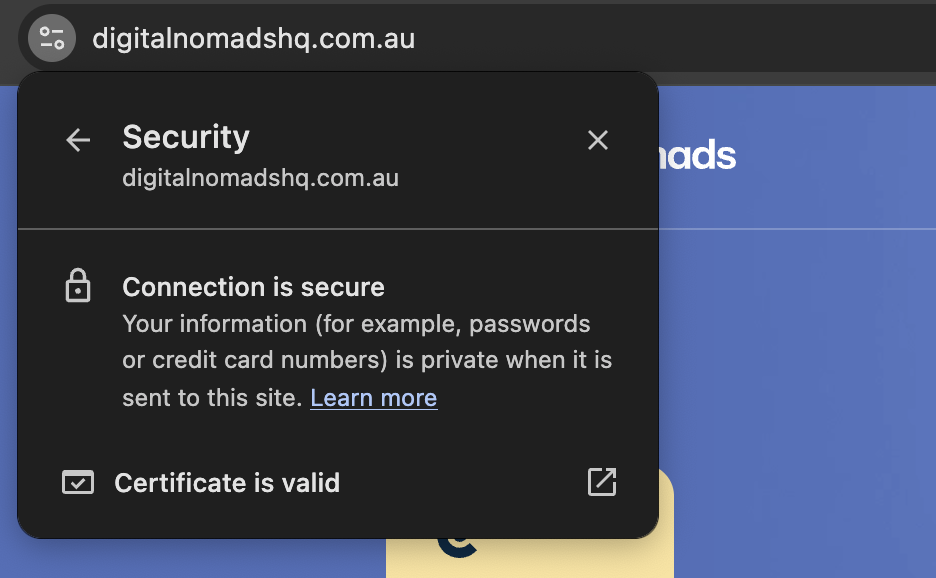
20. SSL Certificate Validation
What to check:
- Valid SSL certificate is installed and not expired
- Certificate covers all subdomains (if applicable, use a wildcard certificate)
- Certificate chain is complete (no intermediate certificate errors)
- SSL is TLS 1.2 or higher (TLS 1.0 and 1.1 are deprecated)
21. HTTPS Implementation
- What to check:
All HTTP URLs redirect to HTTPS via 301 redirects - No mixed content warnings (HTTP resources loaded on HTTPS pages)
- Internal links use HTTPS (not protocol-relative or HTTP)
- Canonical tags reference HTTPS URLs
- Sitemap URLs use HTTPS
- HSTS (HTTP Strict Transport Security) header is implemented
22. Security Headers
What to check:
- X-Content-Type-Options: nosniff is set
- X-Frame-Options is configured (prevents clickjacking)
- Content Security Policy (CSP) headers are in place
- Referrer-Policy is configured appropriately
Structured Data & Schema Markup
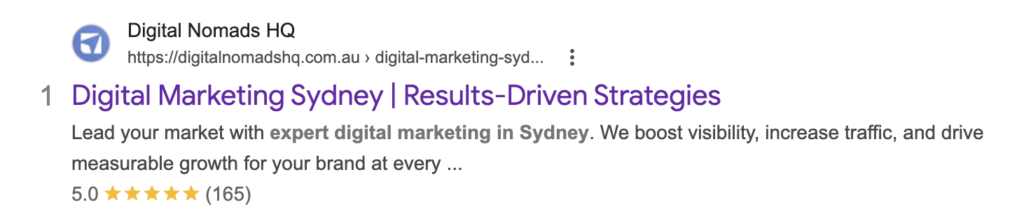
Structured data helps search engines understand the context and meaning of your content. Proper schema
markup can unlock rich results – review stars, FAQ dropdowns, product pricing, event details – which
significantly improve CTR.
23. Schema Markup Audit
What to check:
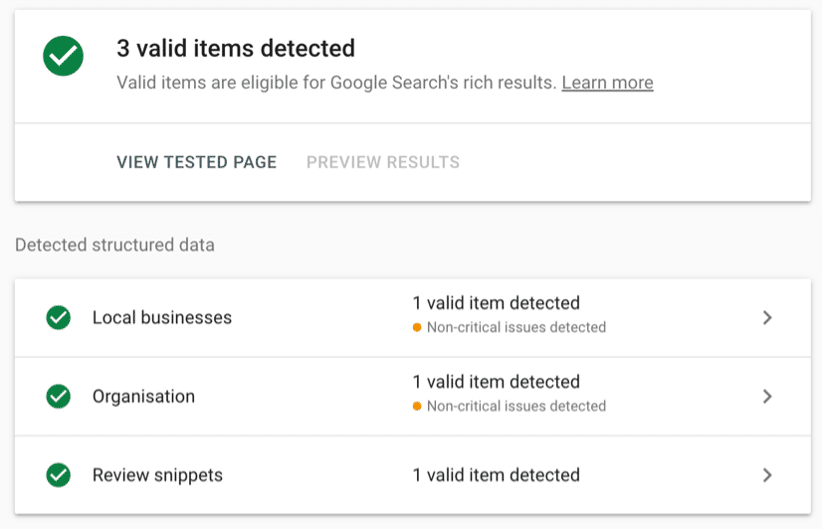
- Organisation or LocalBusiness schema is implemented site-wide
- Page-specific schema is applied where relevant:
- Service pages: Service schema
- Blog posts: Article or Blog Posting schema
- Product pages: Product schema (with price, availability, reviews)
- FAQ sections: FAQPage schema
- Events: Event schema
- Team/people pages: Person schema
- Test with Google’s Rich Results Test tool
- Validate with Schema.org validator
- No errors or warnings in Google Search Console > Enhancements
24. Local SEO Schema
If you’re a local business targeting specific regions – whether that’s the Sunshine Coast, Brisbane, or nationally
– local schema is non-negotiable.
What to check:
- Local Business schema includes accurate NAP (name, address, phone)
- Opening hours are current
- Service area is defined
- Geo Coordinates are included
- Schema is consistent with your Google Business Profile
25. Rich Results Monitoring
What to check:
- Google Search Console > Enhancements section is error-free
- Rich results are appearing in SERPs for eligible content
- Structured data isn’t being used on pages where it doesn’t apply (spammy usage can trigger manual
actions)
International & Multilingual SEO
26. Hreflang Implementation
What to check:
- Hreflang tags are correctly implemented (via HTML, HTTP headers, or XML sitemap)
- Every page references itself AND all its language/region alternatives
- Return tags are in place (if page A references page B, page B must reference page A)
x-default hreflang is set for fallback - No conflicting canonical and hreflang directives
- Language codes follow ISO 639-1 and region codes follow ISO 3166-1 Alpha 2
27. Geotargeting Settings
What to check:
- Country targeting is configured in Google Search Console (for generic TLDs)
- ccTLDs, subdomains, or subdirectories are used correctly for different regions
- Content is genuinely localised (not just machine-translated)
- Server location aligns with target audience (or CDN compensates)
Log File Analysis & Advanced Checks
28. Server Log Analysis
What to check:
- Googlebot crawl frequency and patterns (which pages are crawled most? least?)
- Crawl budget waste – are bots spending time on low-value pages?
- Status code distribution in bot requests (high 5xx error rate = server issues)
- Are important pages being crawled regularly, or are they neglected?
29. Orphan Page Detection
Orphan pages are live pages with zero internal links pointing to them. Search engines struggle to discover these,
and they receive no internal link equity.
What to check:
- Compare crawl data with sitemap and log file data to identify orphan pages
- Ensure all important pages are reachable through internal linking
- Remove or noindex truly unnecessary orphan pages
30. JavaScript Rendering Audit
With modern websites increasingly reliant on JavaScript frameworks (React, Angular, Vue, Next.js), ensuring
search engines can render your content is more important than ever.
What to check:
- Use Google’s URL Inspection tool > “View Tested Page” to see how Google renders your pages
- Compare rendered HTML to source HTML — is critical content missing from the initial HTML?
- Ensure internal links are rendered in the HTML (not just triggered by JavaScript events)
- Lazy-loaded content is accessible to crawlers
Use dynamic rendering or SSR if your content isn’t visible in source HTML
31. Duplicate Content Audit
Duplicate content dilutes ranking signals and confuses search engines about which page to rank.
What to check:
- Parameterised URLs (filters, sorting, tracking codes) are handled via canonicals or parameter handling in
GSC - Printer-friendly versions, HTTP/HTTPS, and www/non-www duplicates are consolidated
- Product variations or similar service pages are sufficiently differentiated
- Content syndication includes canonical tags pointing back to the original
32. Pagination Handling
For blogs, category pages, and eCommerce listing pages with paginated content.
What to check:
- Paginated pages are crawlable (not blocked by robots.txt or noindex)
- Self-referencing canonicals on each paginated page (don’t canonical page 2 to page 1)
- “View All” page is available as an option where practical
- Infinite scroll implementations include crawlable paginated URLs as fallback
Technical SEO Audit Tools We Recommend
You don’t need every tool on the market, but you do need the right ones.
Here’s what our team uses daily:
- Crawling & Analysis: Screaming Frog SEO Spider (our go-to for deep technical crawls), Sitebulb, Lumar
(formerly DeepCrawl) - Performance & Speed: Google PageSpeed Insights, GTmetrix, WebPageTest, Chrome DevTools
- Search Console & Analytics: Google Search Console (essential and free), Google Analytics 4, Bing Webmaster Tools
- Rank Tracking & Research: SEMrush (our primary tool for SEO KPI tracking), Ahrefs
- Structured Data: Google Rich Results Test, Schema.org Validator
- Log Analysis: Screaming Frog Log Analyser, Botify
How Often Should You Run a Technical SEO Audit?
A full technical audit isn’t a one-and-done exercise.
We recommend:
Comprehensive audit: Quarterly, or after any major site change (redesign, migration, platform update, large
content deployment).
Lite health checks: Monthly, focusing on Google Search Console errors, Core Web Vitals, crawl stats, and new
404s.
Continuous monitoring: Set up alerts in Google Search Console for indexing issues, and use site monitoring
tools for uptime and speed regression.
The reality is that websites are living things. Plugins update, developers push code, content gets added and
removed, and hosting environments change. What passed an audit three months ago may not pass today.
Let Our Specialists Handle the Heavy Lifting
We get it – a 30+ point technical checklist can feel overwhelming, especially when you’re running a business.
That’s exactly why businesses across Australia partner with us.
Our SEO team doesn’t just identify technical issues; we prioritise them by impact, fix them, and monitor them
ongoing as part of our SearchLight framework. From WordPress SEO to complex eCommerce SEO builds,
we’ve seen (and fixed) it all.
Want to know where your site stands right now? Grab a free SEO audit from our team – no lock-in
contracts, no fluff, just an honest look at your site’s technical health and what’s actually holding you back.