TL;DR
Most Google Ads audit checklists were written for a platform that no longer exists.
They check keywords, Quality Score, and ad extensions while missing the things that actually cost you money in 2026: broken consent infrastructure, AI campaigns burning budget on irrelevant queries, attribution models that inflate your ROAS, and signal architecture that starves the algorithm of the data it needs. We audit over 250 Google Ads accounts across Australia. Here is what a real audit looks like now.
Most Google Ads Audits Are Sales Pitches Disguised as Strategy
Search “Google Ads audit checklist” and you will find 50 articles that all say the same thing. Check your keywords. Review your match types. Look at your Quality Score.
Make sure you have ad extensions. Optimise your bids.
That advice was fine in 2022. It is dangerously incomplete in 2026.
Google Ads is not the same platform it was two years ago.
The matching system runs on Gemini. Smart Bidding makes decisions using signals you cannot see. Performance Max blends five channels into one black box.
AI Max is rewriting your ads and expanding your queries in real time. And from June 15, your consent infrastructure determines how much data the algorithm even has to work with.
An audit that checks surface metrics while ignoring the data layer underneath is not an audit. It is a comfort blanket.
We’ve managed over 500+ Google Ads accounts across Australia.
We audit new client accounts every week, if not every day!
Here is what we actually look for and why the standard checklist misses the expensive problems.
Why "Free Google Ads Audits" Are Almost Always Useless
Let us be direct about this. The “free Google Ads audit” that most agencies offer is a lead generation tool. Not a diagnostic one.
Here is what a typical free audit checks:
- Click-through rate against industry benchmarks
- Whether you have sitelink extensions
- Keyword count and match type distribution
- Quality Score averages
- Budget utilisation percentage
- Basic conversion tracking presence
These are surface metrics.
They tell you something is happening but not why.
A doctor who only checks your temperature and blood pressure is not giving you a full health assessment. Same principle.
The problems that actually cost Australian businesses money are underneath the surface.
They live in your consent configuration, your attribution model, your conversion action hierarchy, your signal density, and the quality of the data your automated campaigns are learning from.
A real audit takes 4 to 8 hours of expert analysis.
It costs money. And it should.
If someone is offering to audit your account for free, they are looking for easy wins to sell you on, not doing the deep diagnostic work that matters.
Our take:
We still offer a complimentary account review for prospective clients. But we are honest that it is a review, not a full audit. A proper audit goes deeper and costs accordingly. The distinction matters because the things that cost you the most money are the things a quick review will never catch.
What Changed: Auditing in 2024 vs 2026
Two years ago, you controlled Google Ads directly.
You chose keywords, set bids, wrote ad copy, and picked landing pages. The audit framework matched that control: check each lever, see if it is set correctly.
In 2026, you do not control most of those levers anymore. You influence them.
Google’s Gemini models now decide what queries your ads show for.
Smart Bidding decides what you pay.
AI Max rewrites your headlines and descriptions.
Performance Max chooses which channels to run on.
Your job has shifted from operating the machine to feeding the machine the right data and setting the right guardrails.
This means the audit has to shift too. Here is the difference:
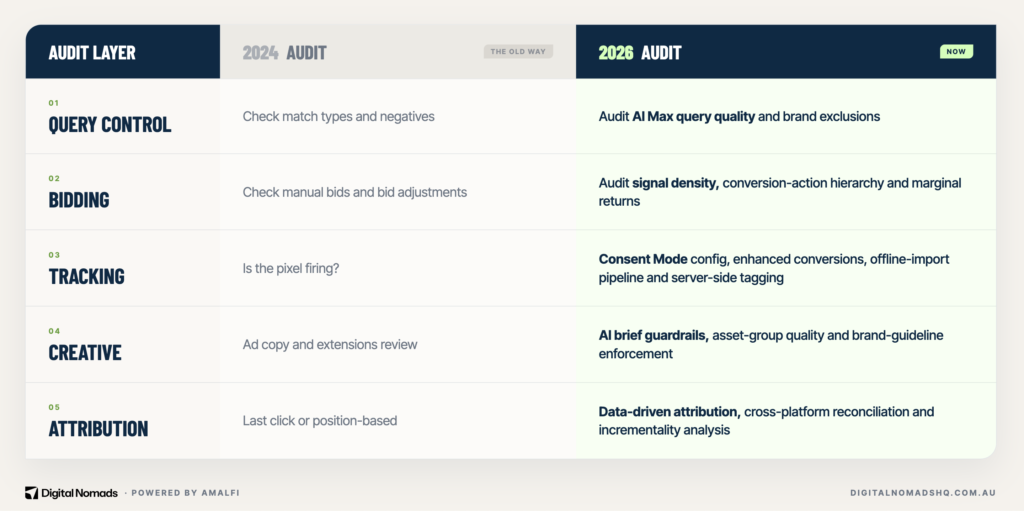
The old audit caught easy problems.
The new audit catches expensive ones. Both matter.
But if you are only doing the first, you are leaving the big money on the table.
1. Consent Infrastructure Is Now the Foundation of Everything
This is the single most overlooked audit item in Google Ads right now.
And it is about to become urgent.
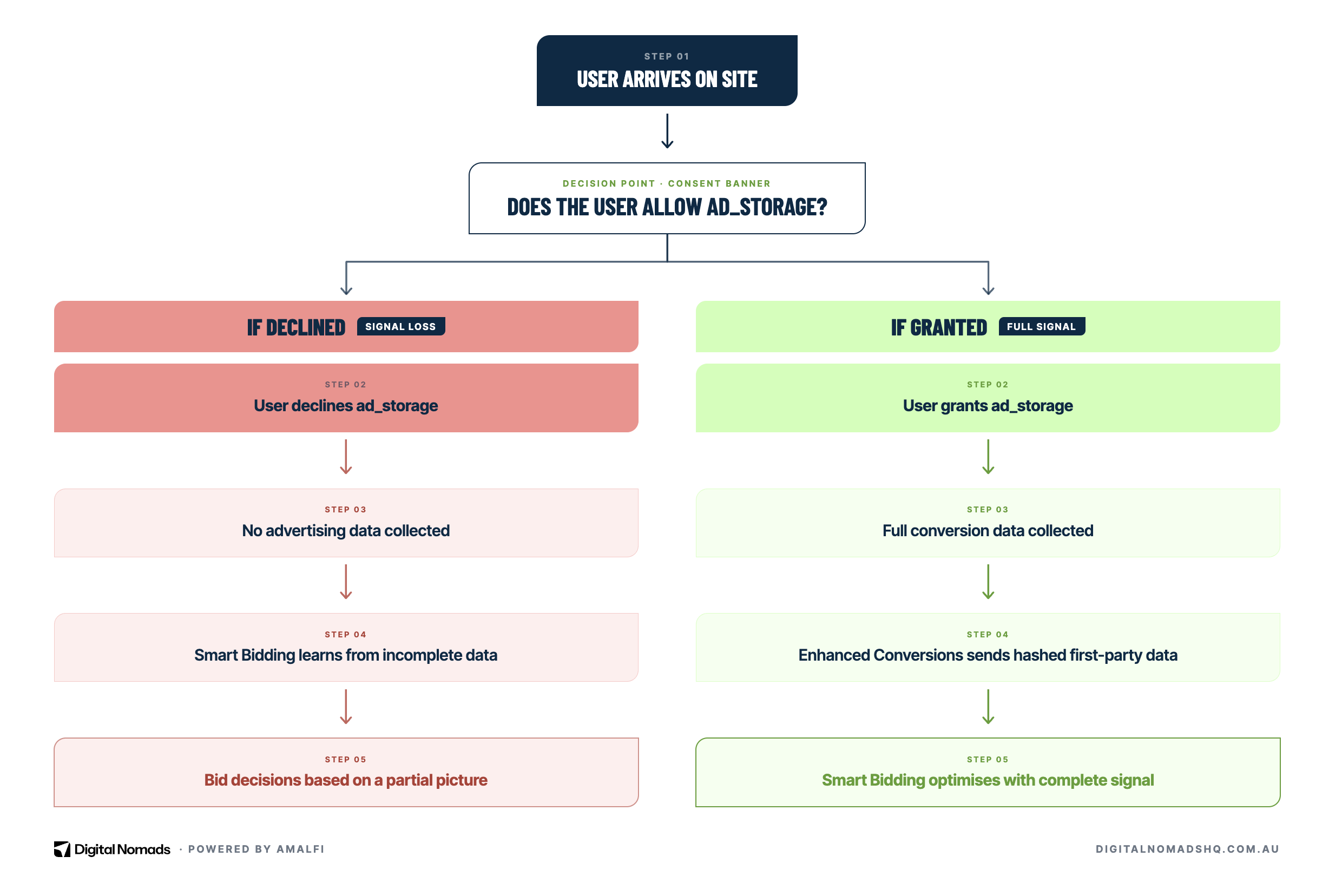
From June 15, 2026, Google Ads stops referencing Google Analytics settings for advertising data. It now relies exclusively on Consent Mode signals.
Specifically the ad_storage parameter.
If a user does not grant ad_storage consent through your Consent Management Platform, Google Ads collects no advertising data from that session.
Think about what that means for Smart Bidding.
The algorithm learns from conversions. If your consent banner is misconfigured and only 40% of users grant consent, Smart Bidding is learning from 40% of your data. It is making bid decisions based on an incomplete picture.
Here is what we check:
- Is your CMP actually implemented correctly? We see consent banners that look functional but are not passing the right signals to Google Tag Manager. The banner exists but it does nothing.
- What are your consent rates? Anything below 70% means significant data loss. Below 50% means your Smart Bidding is essentially guessing.
- Is Enhanced Conversions enabled? This sends hashed first-party data back to Google and helps fill the gap that consent refusals create.
- Is Google Consent Mode v2 deployed? Version 1 does not support the granular signals Google now requires. If you have not upgraded, you are running on the old framework and it will stop working properly.
Deadline alert:
June 15, 2026 is 11 days away. If your consent infrastructure is not ready, your Google Ads campaigns will start losing signal data. This is not optional. Check this now.
2. Signal Architecture: The Layer Most Audits Do Not Know Exists
This concept was best articulated by Jay Stampfl at Search Engine Land earlier this year.
The idea is straightforward: in 2026, you do not control Google Ads directly.
You control the signals that the AI uses to make decisions. The quality of those signals determines the quality of your results.
Signal architecture has three components:
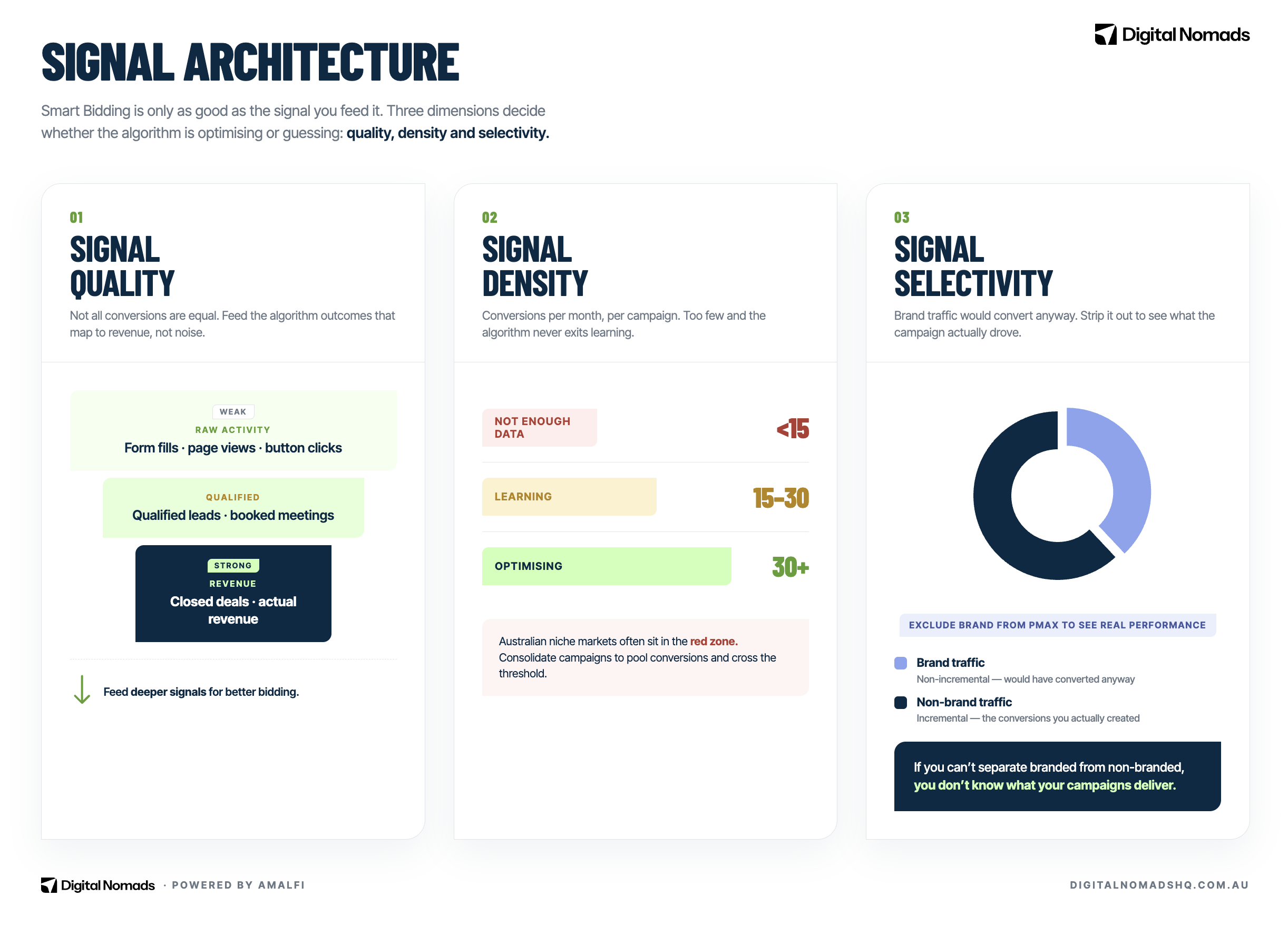
Signal quality
Are you feeding the algorithm the right conversion data?
This is where we find the most expensive mistakes.
A lead generation client optimising for raw form fills is giving Google a terrible signal. Not all leads are equal. A tyre-kicker who fills out a form and never answers the phone is counted the same as a $50,000 contract.
Smart Bidding treats them identically. The fix is importing offline conversion data. Feed back which leads became qualified, which booked meetings, which closed. Journey-aware bidding is built specifically for this.
For ecommerce, the signal quality question is different. Are you passing accurate revenue values? Are returns and refunds being fed back? Is the revenue inclusive or exclusive of GST? Getting this wrong means your Target ROAS is based on inflated numbers.
Signal density
Google recommends 30 or more conversions per month per campaign for Smart Bidding to work effectively. In Australia, many businesses do not hit that threshold.
A niche B2B company spending $3,000 a month might generate 8 conversions.
Smart Bidding does not have enough data to learn.
In these cases, you need strategies to increase density: consolidating campaigns, using broader conversion actions as micro-conversions, or using portfolio bid strategies that pool data across campaigns.
We see accounts all the time where the previous agency has split campaigns so granularly that no individual campaign has enough data to optimise. Beautiful structure. Terrible performance.
Signal selectivity
This is about what data you exclude.
Brand search is the biggest culprit.
If your Performance Max campaign is capturing branded searches, your ROAS looks amazing. But those customers were already going to buy from you. The campaign is taking credit for demand it did not create. We see this constantly.
A PMax campaign reporting a 12:1 ROAS but half the conversions are brand queries that would have happened anyway.
A proper audit separates branded from non-branded performance. If you cannot see that split, you do not know what your campaigns are actually delivering.
3. AI Max and Performance Max: Auditing the Black Box
Google is pushing every advertiser toward automated campaign types. AI Max for Search launches with mandatory DSA migration in September 2026. Performance Max has been the default shopping campaign for two years. These campaigns work differently and they need to be audited differently.
AI Max query quality
We audit the search terms report for AI Max campaigns specifically looking for:
- Relevance drift. Queries that are topically adjacent but not commercially relevant. A plumber showing for “how to fix a leaky tap DIY” is getting traffic that will never convert.
- Competitor queries. AI Max will match you to competitor brand searches unless you explicitly exclude them.
- Informational intent. Queries where the user is researching, not buying. These burn budget fast on broad topics.
Performance Max placement quality
PMax runs across Search, Shopping, Display, YouTube, Gmail, and Discover. The problem is that it does not tell you how much it spends on each channel by default.
Here is what we check:
- Channel distribution. Go to Reports, then Other, then Performance Max Placements. If more than 10-15% of spend is going to Display, investigate. Display within PMax often serves ads inside mobile games and apps where accidental clicks drive up costs with zero conversion intent.
- Asset group performance. Are any asset groups rated “Low” or “Poor”? These drag down the entire campaign.
- Brand traffic cannibalisation. Is PMax eating your brand searches? Add brand exclusions at campaign level. This is the single most impactful PMax optimisation most accounts are missing.
- Search theme alignment. Are your search themes actually aligned with what you sell, or are they leftover from initial setup and never updated?
What we find:
Across our client base, roughly 6 in 10 Performance Max campaigns we audit have no brand exclusions set. This means the campaign is silently capturing branded traffic and reporting inflated ROAS. When we add brand exclusions, reported ROAS drops but actual incremental revenue stays the same or improves because the budget shifts to prospecting.
4. Attribution: Your ROAS Is Probably Wrong
Google moved every account to data-driven attribution as the default model.
This was the right decision. But it created a comparison problem.
If you are comparing this month’s performance to the same month last year, and you were on last-click attribution then, the numbers are not comparable.
Data-driven attribution distributes credit across touchpoints. It makes campaigns that assist conversions look better and campaigns that close conversions look worse compared to last-click.
What we audit:
- Attribution model consistency. Are all conversion actions using the same model? We regularly find accounts where the primary conversion is on data-driven but secondary conversions are still on last-click. The data is contradictory.
- Cross-platform reconciliation. If you are running Google and Meta together, their attribution models disagree. Google uses data-driven. Meta uses click-through plus the new engage-through window. Both platforms will take credit for the same conversion. If you add up both platforms’ reported conversions, you will overcount.
- Incrementality. The hardest question in advertising: would this conversion have happened without the ad? Brand search campaigns, retargeting, and PMax all tend to capture demand rather than create it. A real audit examines whether your campaigns are driving new business or just taking credit for existing demand.
For businesses running across multiple platforms, proper attribution setup is not optional anymore. It is the difference between knowing what is working and guessing.
5. Australia-Specific Considerations Nobody Else Covers
GST and your actual ROAS
Google charges 10% GST on all ad spend in Australia. If your business is registered for GST, you claim this back on your BAS. If you are not, that 10% is a direct cost increase.
But here is what matters for auditing: your ROAS calculation needs to account for this. If your account reports $10 in revenue for every $1 in spend, your actual ROAS is closer to 9:1 after GST on spend. If you are also selling GST-inclusive products, you need to back out GST from revenue too. We see ROAS figures that look strong until you apply real accounting.
Smaller market, different thresholds
Australia has 26 million people. The US has 330 million. Search volumes are proportionally smaller. This has practical implications.
Smart Bidding needs 30 conversions per month to learn effectively. In a US metro, hitting that threshold on a $5,000 monthly budget is easy. In an Australian regional market, the same budget might generate 12 conversions. The algorithm does not have enough data.
We audit for this specifically. If a campaign is below the learning threshold, we either consolidate campaign structure, broaden targeting, or use portfolio bid strategies that pool data. Running granular campaigns with insufficient data is one of the most common mistakes we see in AU accounts.
Location targeting traps
Default location targeting in Google Ads is set to “presence or interest” which means your ads can show to anyone who shows interest in your target area, not just people physically there.
For a local trades business targeting the Sunshine Coast, this means you might be paying for clicks from people in Sydney who searched something mentioning the Sunshine Coast.
We check every account for this. The fix takes 30 seconds but most agencies leave it on default.
6. Lead Gen and Ecommerce Are Two Completely Different Audits
We work across both lead generation and ecommerce clients. The audit framework is fundamentally different for each.
Lead generation audit priorities
- Conversion quality, not quantity. Raw form fills tell you nothing. You need to know which leads became customers. Are you importing offline data back into Google Ads? If not, the algorithm is optimising for volume, not value.
- Search term pollution. Broad match in lead gen pulls in job seekers, support queries, and competitor research. The search terms report is your first stop.
- Call tracking. If phone calls drive revenue and you are not tracking them as conversions, your campaign data is missing half the picture.
- Landing page friction. Lead gen landing pages need to qualify and convert simultaneously. Too much friction and you lose volume. Too little and you get junk leads.
Ecommerce audit priorities
- Product feed quality. This is your most important asset. Missing attributes, incorrect categories, thin descriptions. Google’s AI-powered Shopping Ads are built on your feed data. Bad feed, bad ads.
- Revenue accuracy. Are purchase values correct? Are refunds being tracked? Is revenue GST-inclusive or exclusive? Getting this wrong makes every ROAS calculation meaningless.
- Shopping vs PMax split. Standard Shopping gives you more control and visibility. PMax gives you reach. The right mix depends on your catalogue size, margins, and competitive landscape.
- Cart abandonment retargeting. Is your remarketing actually reaching cart abandoners with specific products, or is it showing generic brand ads to everyone?
7. What to Ask Your Agency (Or What to Ask Yourself)
Whether you are auditing your own account or evaluating whether your agency is doing its job, these are the questions that matter:
- “What conversion action are our campaigns actually optimising for?” If the answer is “all conversions” or they do not know, that is a red flag. Campaigns should optimise for the conversion that represents actual business value.
- “Can you show me branded vs non-branded performance separately?” If they cannot split this out, they cannot tell you whether your campaigns are creating new demand or capturing existing demand.
- “What is our marginal CPA at current spend?” Your first 50 leads might cost $40 each. The next 50 might cost $120. Are you spending past the point of diminishing returns?
- “What percentage of our PMax spend goes to Display?” If they do not know, they have not checked the placement report. That is a problem.
- “Is our Consent Mode configured for the June 15 changes?” If they do not know what you are talking about, you have a bigger problem.
- “What happens to our bidding when we scale spend 30%?” A good agency can tell you where the diminishing returns curve starts. A bad one just says “we will monitor it.”
The standard:
A good agency should be able to answer all six of these questions for your account right now. If they cannot, they are managing your spend but they are not auditing your performance.
The Bottom Line
The Google Ads audit checklist is not dead. But the 2020 version of it is. The platform has changed faster in the last 18 months than in the previous five years. Consent Mode, AI Max, Performance Max, data-driven attribution, signal architecture. These are not edge cases. They are the foundation.
If your last audit did not check your consent infrastructure, did not separate branded from non-branded PMax performance, did not evaluate your conversion action hierarchy, and did not assess whether your signal density supports Smart Bidding, then your last audit missed the expensive stuff.
We run audits for businesses across Australia every week. If you want to see what a 2026 audit actually looks like for your account, get in touch. We will tell you what is working, what is wasting money, and what needs to change.